TTP Commands
ttp-summary command
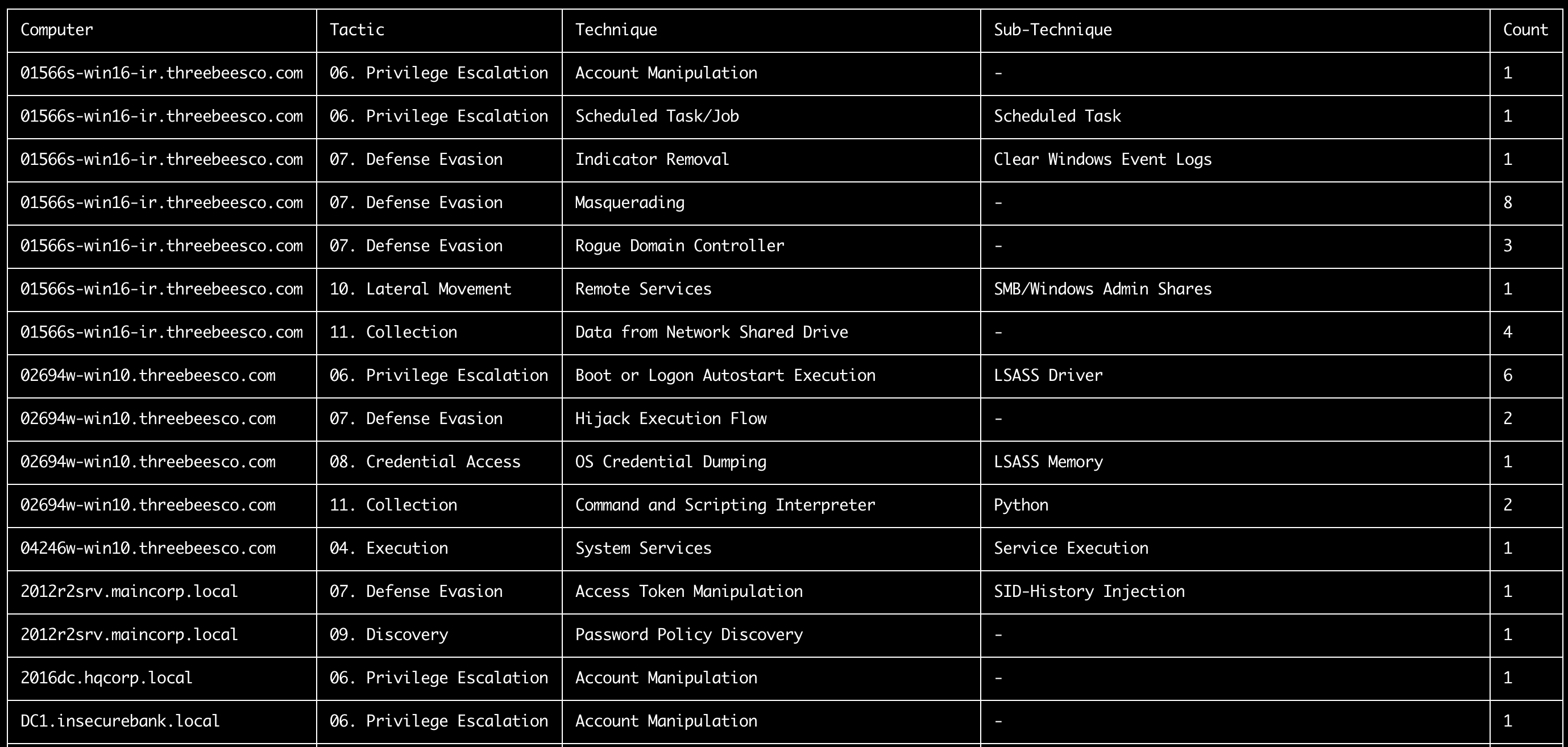
ဤ command သည် sigma rule များ၏ tags field တွင် သတ်မှတ်ထားသော MITRE ATT&CK TTP များအရ ကွန်ပျူတာတစ်ခုစီတွင် တွေ့ရှိရသော tactics နှင့် techniques များကို အကျဉ်းချုပ်ပေးသည်။
- Input: JSONL
- Profile:
%MitreTactics%နှင့်%MitreTags%field များကို output ထုတ်ပေးသော profile တစ်ခု။ (ဥပမာ:verbose,all-field-info-verbose,super-verbose) - Output: Terminal သို့မဟုတ် CSV
လိုအပ်သော options:
-t, --timeline <JSONL-FILE-OR-DIR>: Hayabusa JSONL timeline file သို့မဟုတ် JSONL file များ၏ directory
Options:
-o, --output <CSV-FILE>: ရလဒ်များကို သိမ်းဆည်းရန် CSV file။-q, --quiet: logo ကို မပြသပါနှင့်။ (default:false)
ttp-summary command examples
Hayabusa ဖြင့် JSONL timeline ပြင်ဆင်ပါ:
TTP အကျဉ်းချုပ်ကို terminal သို့ ပုံနှိပ်ပါ:
ရလဒ်များကို CSV file တစ်ခုသို့ သိမ်းဆည်းပါ:
ttp-summary screenshot
ttp-visualize command
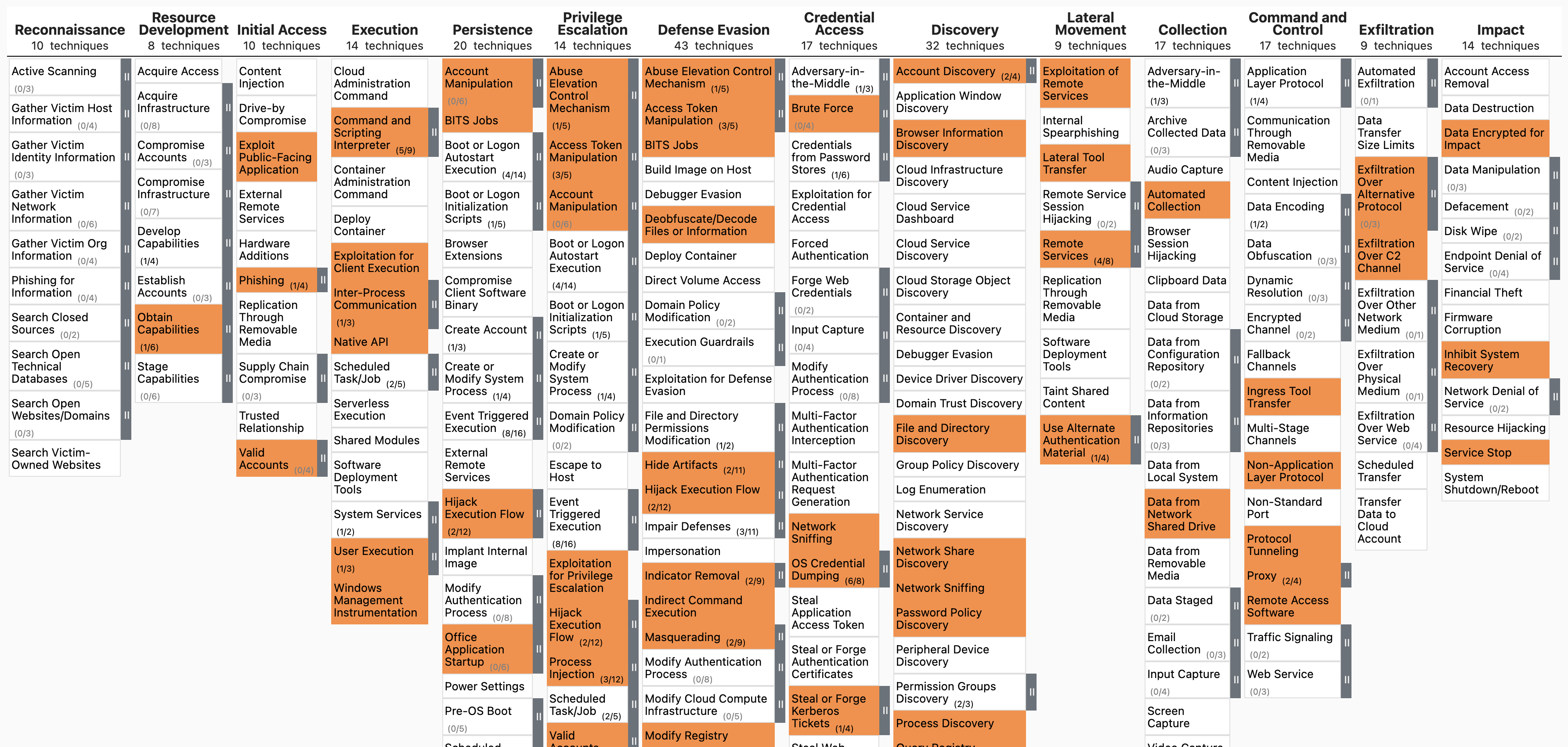
ဤ command သည် TTP များကို ထုတ်ယူပြီး MITRE ATT&CK Navigator တွင် မြင်သာအောင်ပြသရန် JSON file တစ်ခု ဖန်တီးပေးသည်။
- Input: JSONL
- Profile:
%MitreTactics%နှင့်%MitreTags%field များကို output ထုတ်ပေးသော profile တစ်ခု။ (ဥပမာ:verbose,all-field-info-verbose,super-verbose) - Output: JSON
လိုအပ်သော options:
-t, --timeline <JSONL-FILE-OR-DIR>: Hayabusa JSONL timeline file သို့မဟုတ် JSONL file များ၏ directory
Options:
-o, --output <JSON-FILE>: ရလဒ်များကို သိမ်းဆည်းရန် JSON file။ (default:mitre-ttp-heatmap.json)-q, --quiet: logo ကို မပြသပါနှင့်။ (default:false)
ttp-visualize command examples
Hayabusa ဖြင့် JSONL timeline ပြင်ဆင်ပါ:
TTP များကို ထုတ်ယူပြီး mitre-ttp-heatmap.json သို့ သိမ်းဆည်းပါ:
https://mitre-attack.github.io/attack-navigator/ ကို ဖွင့်ပါ၊ Open Existing Layer ကို နှိပ်ပြီး သိမ်းဆည်းထားသော JSON file ကို upload လုပ်ပါ။
ttp-visualize screenshot
ttp-visualize-sigma command
ဤ command သည် Sigma မှ TTP များကို ထုတ်ယူပြီး MITRE ATT&CK Navigator တွင် မြင်သာအောင်ပြသရန် JSON file တစ်ခု ဖန်တီးပေးသည်။
- Input: Sigma rules directory
- Output: JSON
လိုအပ်သော options:
-r, --ruleDir <SIGMA-DIR>: Sigma rules directory
Options:
-o, --output <JSON-FILE>: ရလဒ်များကို သိမ်းဆည်းရန် JSON file။ (default:mitre-attack-navigator.json)-q, --quiet: logo ကို မပြသပါနှင့်။ (default:false)
ttp-visualize-sigma command examples
Sigma repository ကို clone လုပ်ပါ:
Sigma မှ TTP များကို ထုတ်ယူပြီး mitre-attack-navigator.json သို့ သိမ်းဆည်းပါ: