Curating Sigma Rules for Windows Event Logs
This page documents how Yamato Security curates upstream Sigma rules for Windows event logs into a more usable form by de-abstracting the logsource field and filtering out rules that are unusable or hard to use. This is done with the sigma-to-hayabusa-converter tool, which is used mainly to create the curated Sigma ruleset hosted in hayabusa-rules. That ruleset is used by Hayabusa and Velociraptor.
Source
This documentation is maintained alongside the converter tool at Yamato-Security/sigma-to-hayabusa-converter. We hope this information is also useful for other projects that want to use Sigma rules for detecting attacks in Windows event logs. See also Creating Rule Files and Field Modifiers.
TL;DR
- De-abstracting the
logsourcefield and creating new.ymlrule files for built-in rules as well as the original Sysmon-based rules makes full built-in event support for Sigma rules easier, and makes the rules easier for analysts to read. - When writing Sigma rules for Windows event logs, it is important to understand the differences between the original Sysmon-based logs and the compatible built-in logs, and ideally to write your rules so they are compatible with both.
- Many organizations cannot or do not want to install and maintain Sysmon agents on all of their Windows endpoints because they do not have the dedicated resources to handle it, or they want to avoid the risk of any slowdowns or crashes caused by Sysmon. Because of this, it is important to enable as many built-in event logs as possible and to use tools that can detect attacks in those built-in logs.
Challenges with upstream Sigma rules for Windows event logs
The main challenge for creating a native Sigma rule parser for Windows event logs, in our experience, has been to support the logsource field. Currently this is one of the few things that Hayabusa does not yet support natively, as it is still very complex and a work in progress. For the time being, we work around this by converting the upstream rules into an easier-to-use format, as explained in detail below.
About the logsource field
In Sigma rules for Windows event logs, the product field is set to windows, followed by either a service field or a category field.
service field example:
category field example:
Service fields
service fields are relatively simple to handle and tell whatever backend is using the Sigma rule to search for a single channel or multiple channels based on the Channel field in the Windows XML event log.
Single channel example
service: application is the same thing as adding a selection condition of Channel: Application to the Sigma rule.
Multiple channel example
service: applocker currently creates the most channels to search through, as AppLocker saves information in four different logs. In order to properly search just the AppLocker logs, the following condition needs to be added to the Sigma rule logic:
Channel:
    - Microsoft-Windows-AppLocker/MSI and Script
    - Microsoft-Windows-AppLocker/EXE and DLL
    - Microsoft-Windows-AppLocker/Packaged app-Deployment
    - Microsoft-Windows-AppLocker/Packaged app-Execution
Current list of service mappings
| Service | Channel |
|---|---|
| application | Application |
| application-experience | Microsoft-Windows-Application-Experience/Program-Telemetry, Microsoft-Windows-Application-Experience/Program-Compatibility-Assistant |
| applocker | Microsoft-Windows-AppLocker/MSI and Script, Microsoft-Windows-AppLocker/EXE and DLL, Microsoft-Windows-AppLocker/Packaged app-Deployment, Microsoft-Windows-AppLocker/Packaged app-Execution |
| appmodel-runtime | Microsoft-Windows-AppModel-Runtime/Admin |
| appxpackaging-om | Microsoft-Windows-AppxPackaging/Operational |
| bits-client | Microsoft-Windows-Bits-Client/Operational |
| capi2 | Microsoft-Windows-CAPI2/Operational |
| certificateservicesclient-lifecycle-system | Microsoft-Windows-CertificateServicesClient-Lifecycle-System/Operational |
| codeintegrity-operational | Microsoft-Windows-CodeIntegrity/Operational |
| diagnosis-scripted | Microsoft-Windows-Diagnosis-Scripted/Operational |
| dhcp | Microsoft-Windows-DHCP-Server/Operational |
| dns-client | Microsoft-Windows-DNS Client Events/Operational |
| dns-server | DNS Server |
| dns-server-analytic | Microsoft-Windows-DNS-Server/Analytical |
| driver-framework | Microsoft-Windows-DriverFrameworks-UserMode/Operational |
| firewall-as | Microsoft-Windows-Windows Firewall With Advanced Security/Firewall |
| hyper-v-worker | Microsoft-Windows-Hyper-V-Worker |
| kernel-event-tracing | Microsoft-Windows-Kernel-EventTracing |
| kernel-shimengine | Microsoft-Windows-Kernel-ShimEngine/Operational, Microsoft-Windows-Kernel-ShimEngine/Diagnostic |
| ldap_debug | Microsoft-Windows-LDAP-Client/Debug |
| lsa-server | Microsoft-Windows-LSA/Operational |
| microsoft-servicebus-client | Microsoft-ServiceBus-Client |
| msexchange-management | MSExchange Management |
| ntfs | Microsoft-Windows-Ntfs/Operational |
| ntlm | Microsoft-Windows-NTLM/Operational |
| openssh | OpenSSH/Operational |
| powershell | Microsoft-Windows-PowerShell/Operational, PowerShellCore/Operational |
| powershell-classic | Windows PowerShell |
| printservice-admin | Microsoft-Windows-PrintService/Admin |
| printservice-operational | Microsoft-Windows-PrintService/Operational |
| security | Security |
| security-mitigations | Microsoft-Windows-Security-Mitigations* |
| shell-core | Microsoft-Windows-Shell-Core/Operational |
| smbclient-connectivity | Microsoft-Windows-SmbClient/Connectivity |
| smbclient-security | Microsoft-Windows-SmbClient/Security |
| system | System |
| sysmon | Microsoft-Windows-Sysmon/Operational |
| taskscheduler | Microsoft-Windows-TaskScheduler/Operational |
| terminalservices-localsessionmanager | Microsoft-Windows-TerminalServices-LocalSessionManager/Operational |
| vhdmp | Microsoft-Windows-VHDMP/Operational |
| wmi | Microsoft-Windows-WMI-Activity/Operational |
| windefend | Microsoft-Windows-Windows Defender/Operational |
Service mapping sources
We have created YAML mapping files for services to channel names, which we periodically maintain and host in the converter repository. They are based on the service mapping information from SigmaHQ/sigma tests/thor.yml: although this does not seem to be an official generic config file for people to use, it seems to be the most up-to-date.
Category fields
Most category fields simply add a condition to check for certain event IDs in the EventID field, in addition to searching for a specific Channel. The category names are mostly based on Sysmon events, with some additional categories for built-in PowerShell logs and Windows Defender.
Category field example
Current list of category mappings
Some categories map to more than one service/EventID (shown in bold).
| Category | Service | EventIDs |
|---|---|---|
| antivirus | windefend | 1006, 1007, 1008, 1009, 1010, 1011, 1012, 1017, 1018, 1019, 1115, 1116 |
| clipboard_change | sysmon | 24 |
| create_remote_thread | sysmon | 8 |
| create_stream_hash | sysmon | 15 |
| dns_query | sysmon | 22 |
| driver_load | sysmon | 6 |
| file_block_executable | sysmon | 27 |
| file_block_shredding | sysmon | 28 |
| file_change | sysmon | 2 |
| file_creation | sysmon | 11 |
| file_delete | sysmon | 23, 26 |
| file_delete_detected | sysmon | 26 |
| file_executable_detected | sysmon | 29 |
| image_load | sysmon | 7 |
| network_connection | sysmon | 3 |
| network_connection | security | 5156 |
| pipe_created | sysmon | 17, 18 |
| process_access | sysmon | 10 |
| process_creation | sysmon | 1 |
| process_creation | security | 4688 |
| process_tampering | sysmon | 25 |
| process_termination | sysmon | 5 |
| ps_classic_provider_start | powershell-classic | 600 |
| ps_classic_start | powershell-classic | 400 |
| ps_module | powershell | 4103 |
| ps_script | powershell | 4104 |
| raw_access_thread | sysmon | 9 |
| registry_add | sysmon | 12 |
| registry_add | security | 4657 |
| registry_delete | sysmon | 12 |
| registry_event | sysmon | 12, 13, 14 |
| registry_event | security | 4657 |
| registry_rename | sysmon | 14 |
| registry_set | sysmon | 13 |
| registry_set | security | 4657 |
| sysmon_error | sysmon | 255 |
| sysmon_status | sysmon | 4, 16 |
| wmi_event | sysmon | 19, 20, 21 |
Category field challenges
As shown above, the same category can use multiple services and event IDs (indicated in bold). That means it is possible to use some Sigma rules designed for sysmon with similar built-in Windows security event logs, if the fields that the rule uses also exist in the built-in event log. In that case, the field names — and sometimes also the values — may need to be converted to match the field names and values of the built-in security event log. Although this may be as simple as renaming some field names for certain categories, for other categories it may require various conversions in field values as well. How we do this conversion, and the compatibility between sysmon logs and security logs, are explained in detail below.
Category mapping sources
The YAML mapping files for categories are also hosted in the converter repository and are also based on the information from SigmaHQ/sigma tests/thor.yml.
Benefits and challenges of abstracting the log source
There are both benefits and challenges to abstracting the log source and creating mappings for different Channel, EventID and fields on the backend.
Benefits
- It may be easier to convert the
ChannelandEventIDfield names to the proper backend field names when converting Sigma rules to other backend queries. - It is possible to consolidate two rules into one. For example, process creation events can be logged in
Sysmon 1as well asSecurity 4688. Instead of writing two rules that look at different channels, event IDs and fields but otherwise contain the same logic, it is possible to standardize the fields to what Sysmon uses and then have a backend converter add theChannelandEventIDfields and convert other field information if necessary. This makes maintenance of rules easier, as there are fewer rules to maintain. - Although very rare, if a log source starts logging its data in a different
ChannelorEventID, only the mapping logic needs to be updated instead of updating all Sigma rules, making maintenance easier.
Challenges
- What happens if the original Sigma rule based on Sysmon uses a field that does not exist in the built-in logs for filtering out false positives? Should you create the rule anyway, prioritizing possible detection, or ignore it to prioritize fewer false positives? Ideally, two rules would need to be created with different
severity,status, and false positive information in order for the user to handle it better. - It makes filtering rules more difficult, as you cannot just filter based on the
ChannelorEventIDfields in the.ymlfile or the rule's file path if the file has not been created yet — because it is a derived rule for a built-in log instead of the original Sysmon rule. Also, as the rule ID is the same, you cannot filter on rule IDs. - It makes confirming the alert more difficult when the alert comes from a rule for built-in logs that was derived from a Sysmon log. The field names and values will not match up, so the analyst needs to understand the somewhat complex conversion process.
- It makes creating the backend logic more complex.
While we cannot do anything about the first issue besides creating and maintaining new rules when there is a significant use case that justifies the effort, in order to address issues 2–4 we have decided to de-abstract the logsource field and create two sets of rules for any rule that can produce multiple rules. Rules that can detect attacks in built-in logs are output into the builtin directory, and rules for Sysmon are output into the sysmon directory.
Conversion example
Here is a simple example to better understand the conversion process.
Before conversion — the original Sigma rule:
logsource:
    category: process_creation
    product: windows
detection:
    selection:
        - Image|endswith: '.exe'
    condition: selection
After conversion — a Hayabusa-compatible rule for Sysmon logs:
logsource:
    category: process_creation
    product: windows
detection:
    process_creation:
        Channel: Microsoft-Windows-Sysmon/Operational
        EventID: 1
    selection:
        - Image|endswith: '.exe'
    condition: process_creation and selection
...and a Hayabusa-compatible rule for Windows built-in logs:
logsource:
    category: process_creation
    product: windows
detection:
    process_creation:
        Channel: Security
        EventID: 4688
    selection:
        - NewProcessName|endswith: '.exe'
    condition: process_creation and selection
As you can see, two rules have been created: one for Sysmon 1 logs and one for the built-in Security 4688 logs. A new process_creation condition has been added with the channel and event ID information, and it has been added to the condition field to require this condition. Also, the original Image field name has been changed to NewProcessName.
Conversion commonalities
Before explaining in detail how we convert specific categories, here is the part of the conversion that applies to all rules.
- Any rule that has an ID in
ignore-uuid-list.txtis ignored. Currently we only ignore rules that cause false positives on Windows Defender because they have keywords likemimikatzin them. - "Placeholder" rules are ignored because they cannot be used as-is. These are rules placed in the
rules-placeholderfolder in the Sigma repository. -
Rules that use incompatible field modifiers are dropped. Hayabusa supports the majority of field modifiers, so the converter will not output any rule that uses a modifier besides these, in order to avoid parsing errors (see Field Modifiers):
all,base64,base64offset,cased,cidr,contains,endswith,endswithfield,equalsfield,exists,fieldref,gt,gte,lt,lte,re,startswith,utf16,utf16be,utf16le,wide,windash -
Rules with syntax errors are not converted.
- Tags in
deprecatedandunsupportedrules are updated from the V1 format to the V2 format, which uses-instead of_, in order to keep everything consistent and to handle abbreviations in Hayabusa more easily. Example:initial_accessbecomesinitial-access. -
Since we are adding
ChannelandEventIDinformation to rules, we create a new UUIDv4 ID by using the MD5 hash of the original ID, specify the original ID in therelatedfield, and mark thetypeasderived. For rules that can be converted to multiple rules (sysmonandbuiltin), we need to create new rule IDs for the derivedbuiltinrules as well. To do this, we calculate an MD5 hash of thesysmonrule ID and use that for the UUIDv4 ID. For example:Original Sigma rule:
New
sysmonrule:title: 7Zip Compressing Dump Files id: ec570e53-4c76-45a9-804d-dc3f355ff7a7 related: - id: 1ac14d38-3dfc-4635-92c7-e3fd1c5f5bfc type: derivedNew
builtinrule: -
Rules that detect things in built-in Windows event logs are output to the
builtindirectory, while rules that rely on Sysmon logs are output to thesysmondirectory, with sub-directories matching the directories in the upstream Sigma repository.
Conversion limitations
There is only one known bug at the moment: comment lines in Sigma rules will not be included in the output rules unless the comments follow some source code.
Sysmon and built-in event comparison and rule conversion
Process creation
- Category:
process_creation - Sysmon
- Channel:
Microsoft-Windows-Sysmon/Operational - Event ID:
1
- Channel:
- Built-in log
- Channel:
Security - Event ID:
4688
- Channel:
Comparison
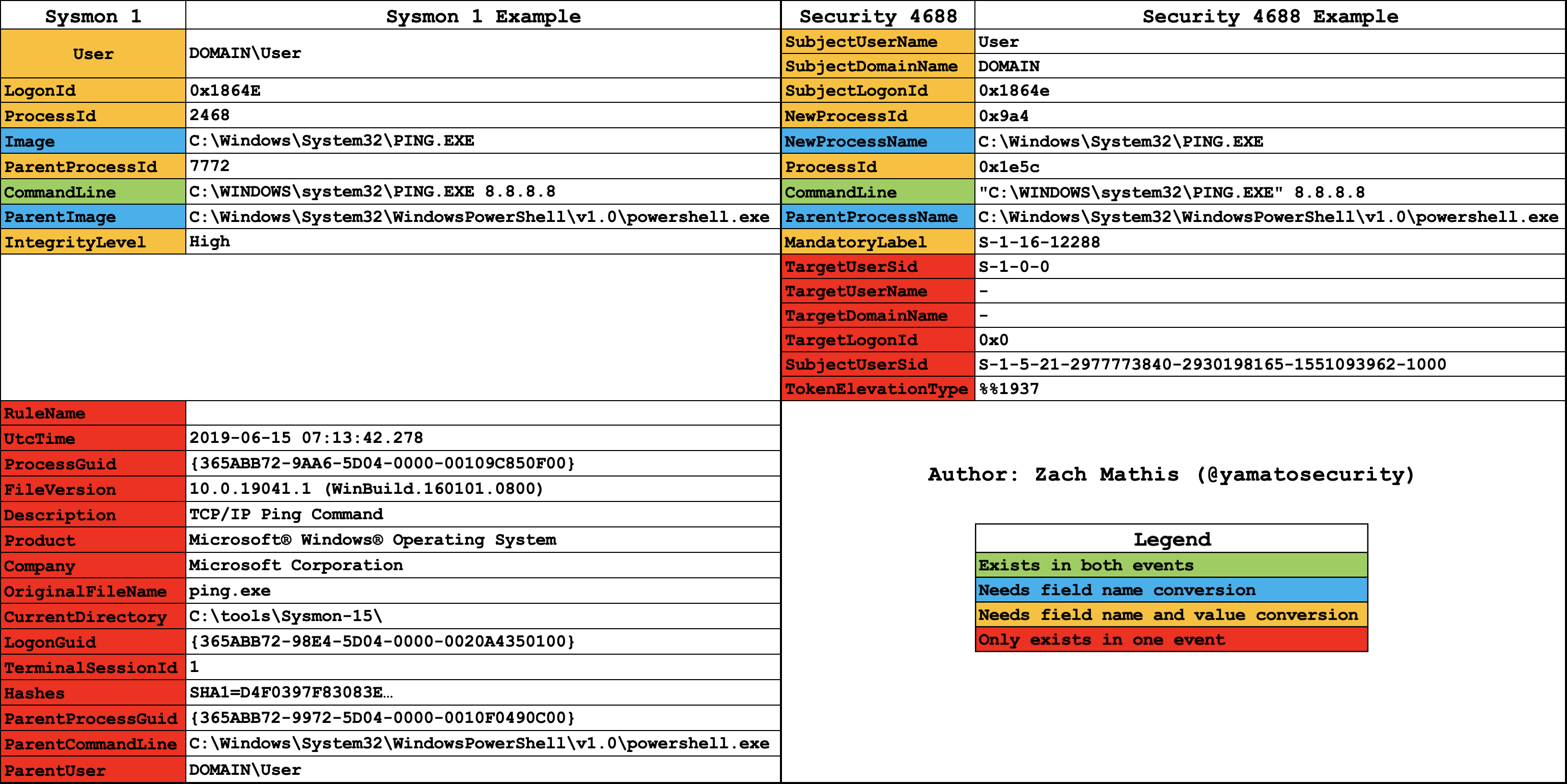
Conversion notes
Userfield information needs to be separated intoSubjectUserNameandSubjectDomainNamefields.LogonIdfield name changes toSubjectLogonId, and any letters in the hex value need to become lowercase.ProcessIdfield name changes toNewProcessId, and the value needs to be converted to hex.Imagefield name changes toNewProcessName.ParentProcessIdfield name changes toProcessId, and the value needs to be converted to hex.ParentImagefield name changes toParentProcessName.IntegrityLevelfield name changes toMandatoryLabel, and the following value conversion is needed:Low:S-1-16-4096Medium:S-1-16-8192High:S-1-16-12288System:S-1-16-16384
- If the rule contains the following fields that only exist in
Security 4688events, then we do not create aSysmon 1rule:SubjectUserSid,TokenElevationType,TargetUserSid,TargetUserName,TargetDomainName,TargetLogonId
- If the rule contains the following fields that only exist in
Sysmon 1events, then we do not create aSecurity 4688rule:RuleName,UtcTime,ProcessGuid,FileVersion,Description,Product,Company,OriginalFileName,CurrentDirectory,LogonGuid,TerminalSessionId,Hashes,ParentProcessGuid,ParentCommandLine,ParentUser
-
There is an exception to #8 and #9: even if a field that only exists in one log event is used, if that field is in an
ORcondition then you still should create that rule. For example, the following rule should not generate aSecurity 4688rule because theOriginalFileNamefield is required (ANDlogic within the selection):However, a rule with the following condition should create a
Security 4688rule becauseOriginalFileNameis optional (ORlogic within the selection):Things get difficult in that your parser has to understand not just the logic inside selections but also inside the
conditionfield. For example, the following rule should not create aSecurity 4688rule because it usesANDlogic:selection_img: Image|endswith: \addinutil.exe selection_orig: OriginalFileName: AddInUtil.exe condition: selection_img and selection_origHowever, the following rule should create a
Security 4688rule because it usesORlogic:
Other notes
- The
SubjectUserSidfield inSecurity 4688shows the SID; however, in the rendered event logMessageit is converted toDOMAIN\User. Security 4688events may not include command line option information inCommandLinedepending on the settings.TokenElevationTypeis displayed as-is in theMessageand not rendered.S-1-16-4096, etc. insideMandatoryLabelgets converted toMandatory Label\Low Mandatory Level, etc. in the renderedMessage.
Built-in log settings
Not enabled by default
The important built-in Security 4688 process creation event logs are not enabled by default. You need to enable both the 4688 events and command line option logging in order to use the majority of Sigma rules.
Enabling with group policy:
Computer Configuration > Policies > Windows Settings > Security Settings > Advanced Audit Configuration > Detailed Tracking > Audit Process Creation:EnabledAdministrative Templates > System > Audit Process Creation > Include command line in process creation events:Enabled
Enabling on the command line:
auditpol /set /subcategory:{0CCE922B-69AE-11D9-BED3-505054503030} /success:enable /failure:enable
reg add HKLM\SOFTWARE\Microsoft\Windows\CurrentVersion\Policies\System\Audit /v ProcessCreationIncludeCmdLine_Enabled /f /t REG_DWORD /d 1
Network connection
- Category:
network_connection - Sysmon
- Channel:
Microsoft-Windows-Sysmon/Operational - Event ID:
3
- Channel:
- Built-in log
- Channel:
Security - Event ID:
5156
- Channel:
Comparison
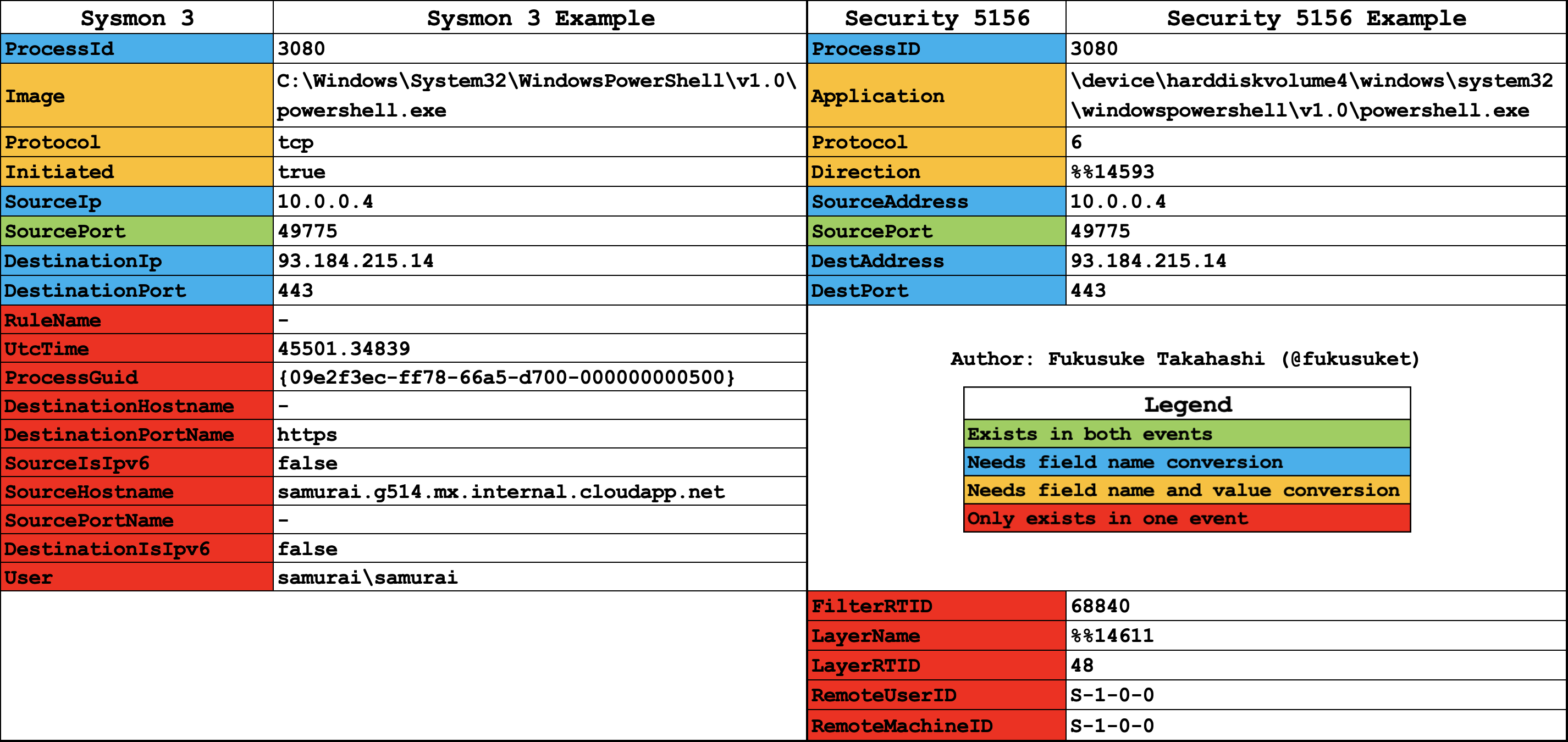
Conversion notes
ProcessIdfield name changes toProcessID.Imagefield name changes toApplication, andC:\changes to\device\harddiskvolume?\. (Note: since we do not know the hard disk volume number, we replace it with a single-character wildcard?.)Protocolfield value oftcpchanges to6andudpchanges to17.Initiatedfield name changes toDirection, and the value oftruechanges to%%14593andfalsechanges to%%14592.SourceIpfield name changes toSourceAddress.DestinationIpfield name changes toDestAddress.DestinationPortfield name changes toDestPort.
Built-in log settings
Not enabled by default
Built-in Security 5156 network connection logs are not enabled by default. They create a large amount of logs, which may overwrite other important logs in the Security event log and potentially slow down the system if it has a high number of network connections. Make sure the maximum file size for the Security log is high, and test to make sure there are no adverse effects to the system.
Enabling with group policy:
Computer Configuration -> Windows Settings -> Security Settings -> Advanced Audit Policy Configuration -> System Audit Policies -> Object Access -> Filtering Platform Connection:Success and Failure
Enabling on the command line:
...or the following if you are using a non-English locale:
See also
For more on enabling the built-in Windows event logs needed to capture the evidence these rules rely on, see Windows Logging & Sysmon and the EnableWindowsLogSettings project.
Sigma rule writing advice
Tip
If you use any field that exists in a sysmon log but not a builtin log, make sure you make that field optional so that it is still possible to use the rule for builtin logs.
For example:
This selection looks for when the process (Image) is named addinutil.exe. The problem is that an attacker could just rename the file to bypass the rule. The OriginalFileName field, which only exists in Sysmon logs, is the filename that gets embedded into the binary at compile time. Even if an attacker renames the file, the embedded name will not change, so this rule can detect attacks where the attacker has renamed the file when using Sysmon, and can also detect attacks where the filename was not changed when using standard built-in logs.
Pre-converted Sigma rules
Sigma rules curated in the way described on this page — by de-abstracting the logsource field — are hosted in the hayabusa-rules repository under the sigma folder.
Tool environment
If you want to locally convert Sigma rules into Hayabusa-compatible format, you first need to install Poetry. Please refer to the official Poetry installation documentation.
Tool usage
sigma-to-hayabusa-converter.py is our main tool to convert the logsource field of Sigma rules to Hayabusa-compatible format. Perform the following tasks to run it:
git clone https://github.com/SigmaHQ/sigma.git
git clone https://github.com/Yamato-Security/sigma-to-hayabusa-converter.git
cd sigma-to-hayabusa-converter
poetry install --no-root
poetry run python sigma-to-hayabusa-converter.py -r ../sigma -o ./converted_sigma_rules
After executing the commands above, the rules converted to Hayabusa-compatible format will be output to the ./converted_sigma_rules directory.