Rust Performance Guide for Hayabusa Developers
Author
Fukusuke Takahashi
English translation
Zach Mathis (@yamatosecurity)
About this document
Hayabusa (English: "peregrine falcon") is a fast forensics analysis tool developed by the Yamato Security group in Japan. It is developed in Rust in order to (threat) hunt as fast as a peregrine falcon. Rust is a fast language in itself, however, there are many pitfalls that can result in slow speeds and high memory usage. We created this document based on actual performance improvements in Hayabusa (see the changelog here), but these techniques should be applicable to other Rust programs as well. We hope you can benefit from the knowledge we have gained through our trial and error.
Speed improvement
Change the memory allocator
Simply changing the default memory allocator may improve speed significantly. For example, according to these benchmarks, the following two memory allocators
are much faster than the default memory allocator. We were able to confirm a significant speed improvement by changing our memory allocator from jemalloc to mimalloc, so we made mimalloc the default since version 1.8.0. (Although mimalloc does use slightly more memory than jemalloc.)
Before 
After 
You only need to perform the following 2 steps in order to change the global memory allocator:
- Add the mimalloc crate to the
Cargo.tomlfile's [dependencies] section: - Define that you want to use mimalloc under #[global_allocator] somewhere in the program: That is all you need to do to change the memory allocator.
Effectiveness(Real example from a Pull Request) 
How much speed improves will depend on the program, but in the following example
changing the memory allocator to mimalloc resulted in a 20-30% performance increase on Intel CPUs. (For some reason, there was not as a significant performance increase on ARM based macOS devices.)
Reduce IO processing in loops
Disk IO processing is much slower than processing in memory. Therefore, it is desirable to avoid IO processing as much as possible, especially in loops.
Before 
The example below shows a file open occuring one million times in a loop:
use std::fs;

fn main() {
    for _ in 0..1000000 {
        let f = fs::read_to_string("sample.txt").unwrap();
        f.len();
    }
}
After 
By opening the file outside of the loop as follows
use std::fs;

fn main() {
    let f = fs::read_to_string("sample.txt").unwrap();
    for _ in 0..1000000 {
        f.len();
    }
}
Effectiveness(Real example from a Pull Request) 
In the following example, the IO processing when handling one detection result at a time was able to be performed outside of the loop:
This resulted in a speed improvement of about 20%.
Avoid regular expression compilation in loops
Regular expression compilation is a very costly process compared to regular expression matching. Therefore, it is advisable to avoid regular expression compilation as much as possible, especially in loops.
Before 
For example, the following process creates 100,000 attempts to match a regular expression in a loop:
extern crate regex;
use regex::Regex;

fn main() {
    let text = "1234567890";
    let match_str = "abc";
    for _ in 0..100000 {
        if Regex::new(match_str).unwrap().is_match(text){ // Regular expression compilation in a loop
            println!("matched!");
        }
    }
}
After 
By doing a regular expression compilation outside the loop, as shown below
extern crate regex;
use regex::Regex;

fn main() {
    let text = "1234567890";
    let match_str = "abc";
    let r = Regex::new(match_str).unwrap(); // Compile the regular expression outside the loop
    for _ in 0..100000 {
        if r.is_match(text) {
            println!("matched!");
        }
    }
}
Effectiveness(Real example from a Pull Request) 
In the following example, regular expression compilation is performed outside the loop and cached.
This resulted in significant speed improvements.
Use buffer IO
Without buffer IO, file IO is slow. With buffer IO, IO operations are performed through buffers in memory, reducing the number of system calls and improving speed.
Before 
For example, in the following process, write occurs 1,000,000 times.
use std::fs::File;
use std::io::{BufWriter, Write};

fn main() {
    let mut f = File::create("sample.txt").unwrap();
    for _ in 0..1000000 {
        f.write(b"hello world!");
    }
}
After 
By using BufWriter as follows
use std::fs::File;
use std::io::{BufWriter, Write};

fn main() {
    let mut f = File::create("sample.txt").unwrap();
    let mut writer = BufWriter::new(f);
    for _ in 0..1000000 {
        writer.write(b"some text");
    }
    writer.flush().unwrap();
}
Effectiveness(Real example from a Pull Request) 
The method described above was implemented here
and has resulted in significant speed improvements in output processing.
Use standard String methods instead of regular expressions
While regular expressions can cover complex matching patterns, they are slower than standard String methods. Therefore, it is faster to use standard String methods for simple string matching such as the following.
- Starts-with matching(Regex:
foo.*)-> String::starts_with() - Ends-with matching(Regex:
.*foo)-> String::ends_with() - Contains matching(Regex:
.*foo.*)-> String::contains()
Before 
For example, the following code performs ends-with matching in a regular expression one million times.
extern crate regex;
use regex::Regex;

fn main() {
    let text = "1234567890";
    let match_str = ".*abc";
    let r = Regex::new(match_str).unwrap();
    for _ in 0..1000000 {
        if r.is_match(text) {
            println!("matched!");
        }
    }
}
After 
By using String::ends_with() as follows
fn main() {
    let text = "1234567890";
    let match_str = "abc";
    for _ in 0..1000000 {
        if text.ends_with(match_str) {
            println!("matched!");
        }
    }
}
Effectiveness(Real example from a Pull Request) 
Since Hayabusa requires case-insensitive string comparison, we use to_lowercase() and then apply the above method. Even then, in the following examples
- Imporving speed by changing wildcard search process from regular expression match to starts_with/ends_with match #890
- Improving speed by using eq_ignore_ascii_case() before regular expression match #884
speed has improved by about 15% compared to before.
Filter by string length
Depending on the characteristics of the strings being handled, adding a simple filter may reduce the number of string matching attempts and speed up the process. If you often compare strings of non-fixed and unmatched string lengths, you can speed up the process by using string length as a primary filter.
Before 
For example, the following code attempts one million regular expression matches.
extern crate regex;
use regex::Regex;

fn main() {
    let text = "1234567890";
    let match_str = "abc";
    let r = Regex::new(match_str).unwrap();
    for _ in 0..1000000 {
        if r.is_match(text) {
            println!("matched!");
        }
    }
}
After 
By using String::len() as a primary filter, as shown below
extern crate regex;
use regex::Regex;

fn main() {
    let text = "1234567890";
    let match_str = "abc";
    let r = Regex::new(match_str).unwrap();
    for _ in 0..1000000 {
        if text.len() == match_str.len() { // Primary filter by string length
            if r.is_match(text) {
                println!("matched!");
            }
        }
    }
}
Effectiveness(Real example from a Pull Request) 
In the following example, the above method is used.
This improved speed by about 15%.
Do not compile with codegen-units=1
Many articles on performance optimization with Rust advise to add codegen-units = 1 under the [profile.release] section.
This will cause slower compilation times as the default is to compile in parallel but in theory should result in more optimized and faster code.
However, in our testing, Hayabusa actually runs slower with this option turned on and compilation takes longer so we keep this off.
The binary size of the executable is about 100kb smaller so this may be ideal for embedded systems where hard disk space is limited.
Reducing memory usage
Avoid unnecessary use of clone(), to_string(), and to_owned()
Using clone() or to_string() are easy ways to resolve compilation errors related to ownership. However, they will usually result in high usage of memory and should be avoided. It is always best to first see if you can replace them with low cost references.
Before 
For example, if you want to iterate the same Vec multiple times, you can use clone() to eliminate compilation errors.
fn main() {
    let lst = vec![1, 2, 3];
    for x in lst.clone() { // In order to eliminate compile errors
        println!("{x}");
    }

    for x in lst {
        println!("{x}");
    }
}
After 
However, by using references as shown below, you can remove the need to use clone().
fn main() {
    let lst = vec![1, 2, 3];
    for x in &lst { // Eliminate compile errors with a reference
        println!("{x}");
    }

    for x in lst {
        println!("{x}");
    }
}
Effectiveness(Real example from a Pull Request) 
In the following example, by replacing unnecessary clone(), to_string(), and to_owned() usage,
we were able to significantly reduce memory usage.
Use Iterator instead of Vec
Vec keeps all elements in memory, so it uses a lot of memory in proportion to the number of elements. If processing one element at a time is sufficient, then using an Iterator instead will use much less memory.
Before 
For example, the following return_lines() function reads a file of about 1 GB and returns a Vec:
use std::fs::File;
use std::io::{BufRead, BufReader};

fn return_lines() -> Vec<String> {
    let f = File::open("sample.txt").unwrap();
    let buf = BufReader::new(f);
    buf.lines()
        .map(|l| l.expect("Could not parse line"))
        .collect()
}

fn main() {
    let lines = return_lines();
    for line in lines {
        println!("{}", line)
    }
}
After 
Instead you should return an Iterator Trait as follows:
use std::fs::File;
use std::io::{BufRead, BufReader};

fn return_lines() -> impl Iterator<Item=String> {
    let f = File::open("sample.txt").unwrap();
    let buf = BufReader::new(f);
    buf.lines()
        .map(|l| l.expect("Could not parse line"))
        // ここでcollect()せずに、Iteratorを戻り値として返す
}

fn main() {
    let lines = return_lines();
    for line in lines {
        println!("{}", line)
    }
}
Box<dyn Iterator<Item = T>> as follows:
use std::fs::File;
use std::io::{BufRead, BufReader};

fn return_lines(need_filter:bool) -> Box<dyn Iterator<Item = String>> {
    let f = File::open("sample.txt").unwrap();
    let buf = BufReader::new(f);
    if need_filter {
        let result= buf.lines()
            .filter_map(|l| l.ok())
            .map(|l| l.replace("A", "B"));
        return Box::new(result)
    }
    let result= buf.lines()
        .map(|l| l.expect("Could not parse line"));
    Box::new(result)
}

fn main() {
    let lines = return_lines(true);
    for line in lines {
        println!("{}", line)
    }
}
Effectiveness(Real example from a Pull Request) 
The following example uses the method described above:
When tested on a 1.7GB JSON file, memory decreased by 75%.
Use the compact_str crate when handling short strings
When dealing with a large number of short strings of less than 24 bytes, the compact_str crate can be used to reduce memory usage.
Before 
In the example below, the Vec holds 10 million strings.
fn main() {
    let v: Vec<String> = vec![String::from("ABCDEFGHIJKLMNOPQRSTUV"); 10000000];
    // do some kind of processing
}
After 
It is better to replace them with a CompactString:
use compact_str::CompactString;

fn main() {
    let v: Vec<CompactString> = vec![CompactString::from("ABCDEFGHIJKLMNOPQRSTUV"); 10000000];
    // do some kind of processing
}
Effectiveness(Real example from a Pull Request) 
In the following example, short strings are handled with CompactString:
This gave a reduction of memory usage by about 20%.
Delete unnecessary fields in long-lived structures
Structures that continue to be retained in memory during process startup may affect the overall memory usage. In Hayabusa, the following structures (as of version 2.2.2), in particular, are retained in large numbers.
The removal of fields associated with the above structures had some effect on reducing overall memory usage.
Before 
For example, the DetectInfo field was, until version 1.8.1, the following:
#[derive(Debug, Clone)]
pub struct DetectInfo {
    pub rulepath: CompactString,
    pub ruletitle: CompactString,
    pub level: CompactString,
    pub computername: CompactString,
    pub eventid: CompactString,
    pub detail: CompactString,
    pub record_information: CompactString,
    pub ext_field: Vec<(CompactString, Profile)>,
    pub is_condition: bool,
}
After 
By deleting the record_information field as follows
#[derive(Debug, Clone)]
pub struct DetectInfo {
    pub rulepath: CompactString,
    pub ruletitle: CompactString,
    pub level: CompactString,
    pub computername: CompactString,
    pub eventid: CompactString,
    pub detail: CompactString,
    // remove record_information field
    pub ext_field: Vec<(CompactString, Profile)>,
    pub is_condition: bool,
}
Effectiveness(Real example from a Pull Request) 
In the following example, when tested against data where the number of detection result records was about 1.5 million,
- Reduced memory usage of DetectInfo/EvtxRecordInfo #837
- Reduce memory usage by removing unnecessary regex #894
we were able to achieve about a 300MB reduction in memory usage.
Benchmarking
Use the memory allocator's statistics function.
Some memory allocators maintain their own memory usage statistics. For example, in mimalloc, the mi_stats_print_out() function can be called to obtain memory usage.
How to obtain statistics 
Prerequisites: You need to be using mimalloc as explained in the Change the memory allocator section.
- In
Cargo.toml's dependencies section, add the libmimalloc-sys crate: - Whenever you want to print the memory usage statistics, write the following code and inside an
unsafeblock, call mi_stats_print_out(). The memory usage statistics will be outputted to standard out. -
The upper left
peak/reservedvalue is the maximum memory usage.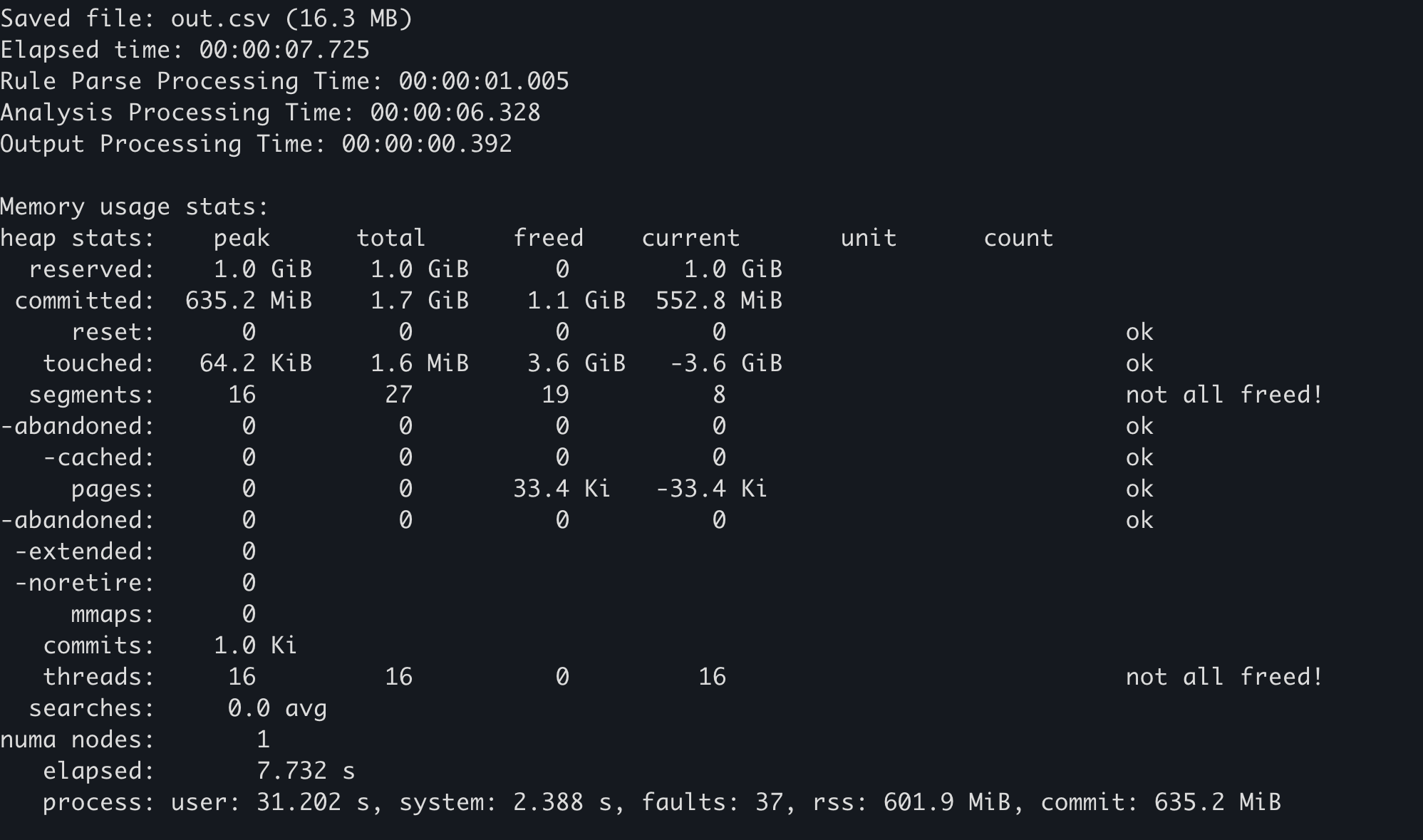
Example 
The above implementation was applied in the following:
In Hayabusa, if you add the --debug option, memory usage statistics will be outputted at the end.
Use Windows' performance counter
Various resource usage can be checked from statistics that can be obtained on the OS side. In this case, the following two points should be noted.
- Influence from anti-virus software (Windows Defender)
- Only the first run is affected by the scan and is slower, so results from the second and subsequent runs after the build are suitable for comparison. (Or you can disable your anti-virus for more accurate results.)
- Influence from file caching
- The results from the second and subsequent times after OS startup are faster than the first time because evtx and other file IOs are read from the file cache in memory, so the results from the first time after the OS boots is more ideal for taking benchmarks.
How to obtain 
Prerequisites:The following procedure is only valid for environments where PowerShell 7 is already installed on Windows.
- Restart the OS
- Run
PowerShell 7's Get-Counter command which will continuously record the performance counter every second to a CSV file. (If you would like to measure resources other than those listed below, this article is a good reference.) - Execute the process you want to measure.
Example 
The following contains an example procedure for measuring performance with Hayabusa.
Use heaptrack
heaptrack is a sophisticated memory profiler available for Linux and macOS. By using heaptrack, you can thoroughly investigate bottlenecks.
How to obtain 
Prerequisites: Below is the procedure for Ubuntu 22.04. You cannot use heaptrack on Windows.
- Install heaptrack with the following two commands.
- Remove the following mimalloc code from Hayabusa. (You cannot use heaptrack's memory profiler with mimalloc.
- https://github.com/Yamato-Security/hayabusa/blob/v2.2.2/src/main.rs#L32-L33
- https://github.com/Yamato-Security/hayabusa/blob/v2.2.2/src/main.rs#L59-L60
-
https://github.com/Yamato-Security/hayabusa/blob/v2.2.2/src/main.rs#L632-L634
-
Delete the [profile.release] section in Hayabusa's
Cargo.tomlfile and change it to the following: -
Build a release build:
cargo build --release - Run
heaptrack hayabusa dfir-timeline -d sample -o out.csv
Now when Hayabusa finishes running, heaptrack's results will automatically open in a GUI application.
Examples 
An example of heaptrack's results are shown below. The Flame Graph and Top-Down tabs allow you to visually check functions with high memory usage.
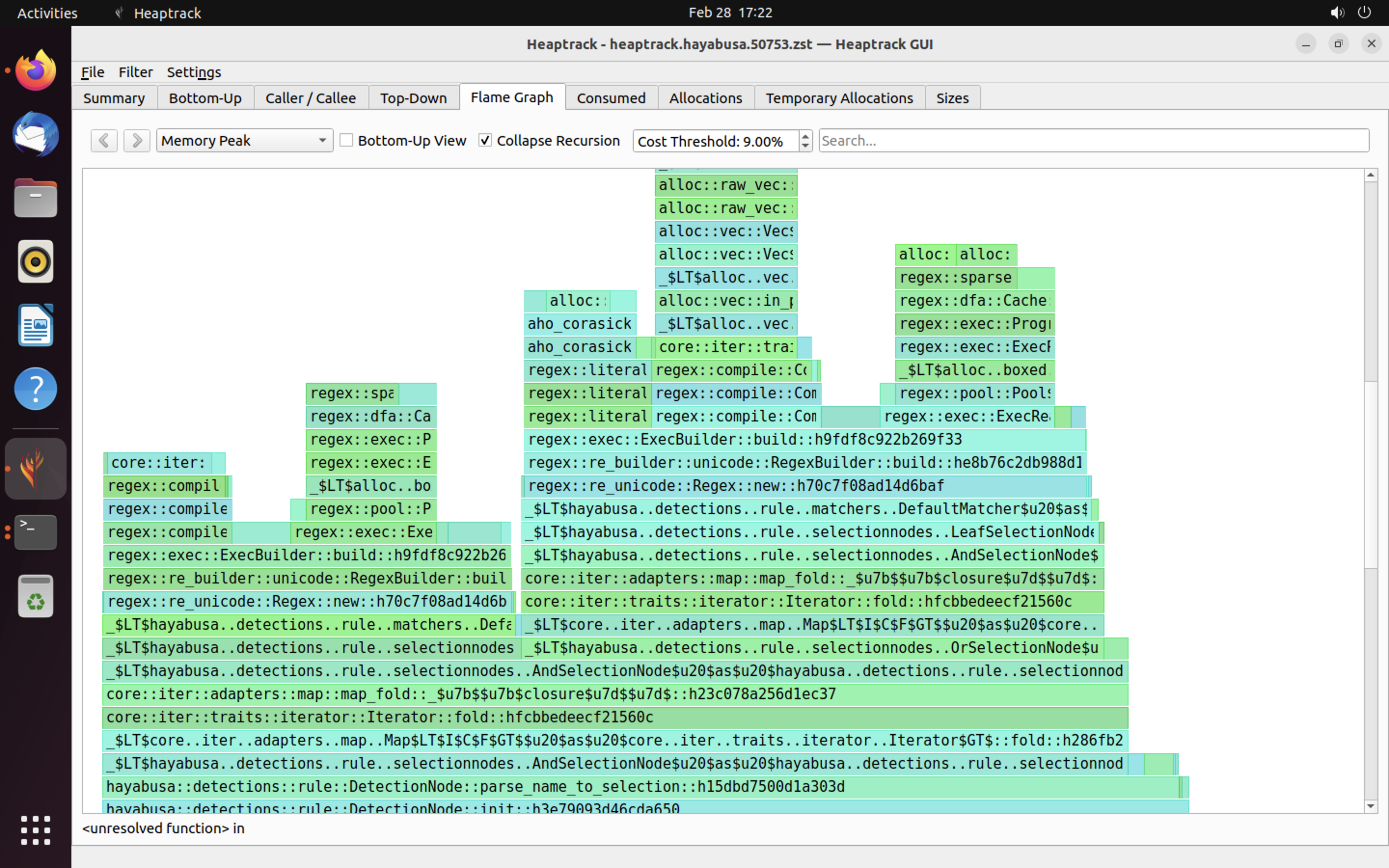
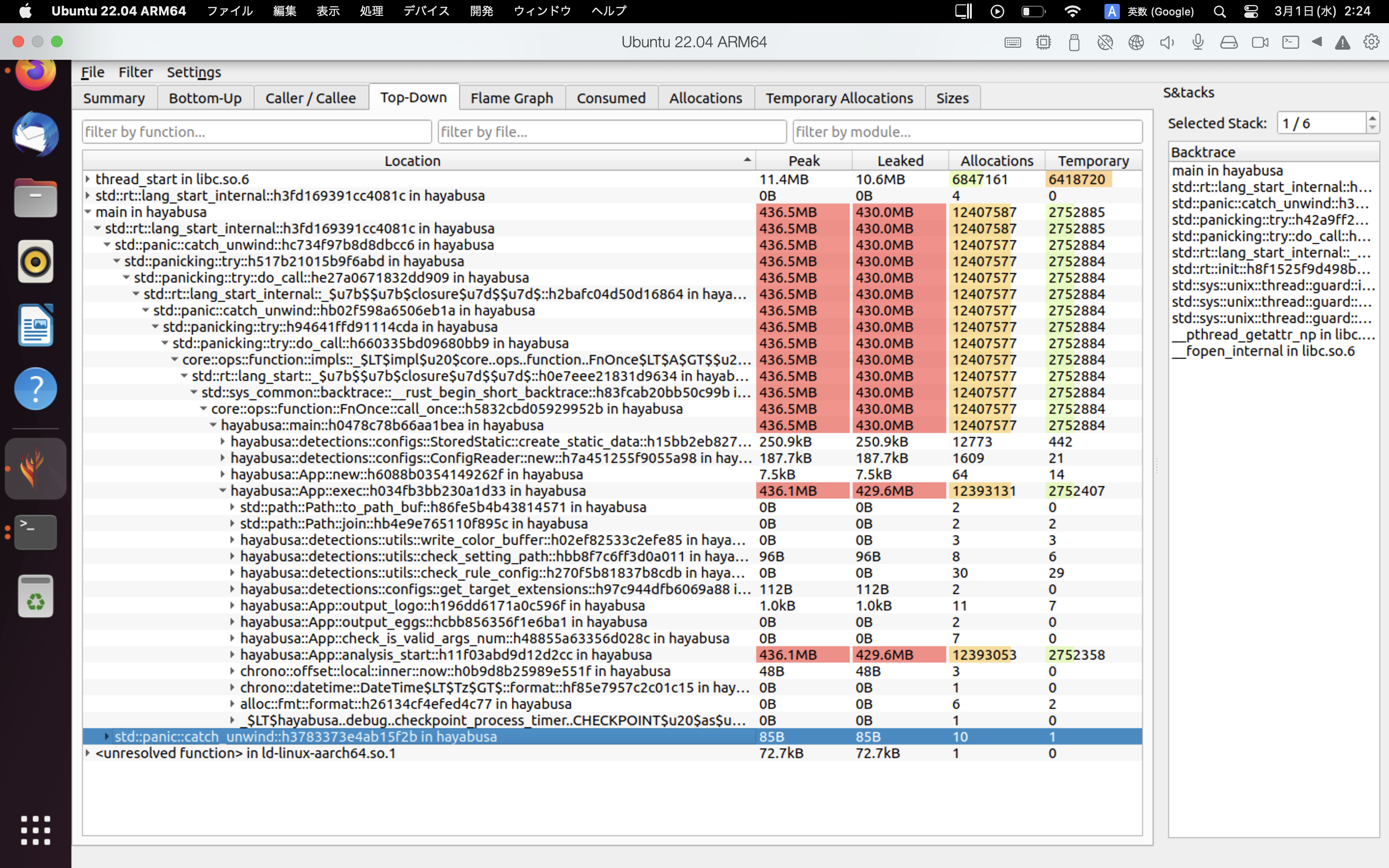
References
Contributions
This document is based on findings from actual improvement cases in Hayabusa. If you find any errors or techniques that can improve performance, please send us an issue or pull request.