Deprecated features
The deprecated special keywords and count aggregation are still supported in Hayabusa but will not be used inside rules in the future.
Deprecated special keywords
Currently, the following special keywords can be specified:
value: matches by string (wildcards and pipes can also be specified).min_length: matches when the number of characters is greater than or equal to the specified number.regexes: matches if one of the regular expressions in the file that you specify in this field matches.allowlist: rule will be skipped if there is any match found in the list of regular expressions in the file that you specify in this field.
In the example below, the rule will match if the following are true:
ServiceNameis calledmalicious-serviceor contains a regular expression in./rules/config/regex/detectlist_suspicous_services.txt.ImagePathhas a minimum of 1000 characters.ImagePathdoes not have any matches in theallowlist.
detection:
    selection:
        Channel: System
        EventID: 7045
        ServiceName:
            - value: malicious-service
            - regexes: ./rules/config/regex/detectlist_suspicous_services.txt
        ImagePath:
            min_length: 1000
            allowlist: ./rules/config/regex/allowlist_legitimate_services.txt
    condition: selection
regexes and allowlist keyword sample files
Hayabusa had two built-in regular expression files used for the ./rules/hayabusa/default/alerts/System/7045_CreateOrModiftySystemProcess-WindowsService_MaliciousServiceInstalled.yml file:
./rules/config/regex/detectlist_suspicous_services.txt: to detect suspicious service names./rules/config/regex/allowlist_legitimate_services.txt: to allow legitimate services
Files defined in regexes and allowlist can be edited to change the behavior of all rules that reference them without having to change any rule file itself.
You can also use different detectlist and allowlist textfiles that you create.
Deprecated aggregation conditions (count rules)
This is still supported in Hayabusa but will be replaced by Sigma correlation rules in the future.
Basics
The condition keyword described above implements not only AND and OR logic, but is also able to count or "aggregate" events.
This function is called the "aggregation condition" and is specified by connecting a condition with a pipe.
In this password spray detection example below, a conditional expression is used to determine if there are 5 or more TargetUserName values from one source IpAddress within a time frame of 5 minutes.
detection:
  selection:
    Channel: Security
    EventID: 4648
  condition: selection | count(TargetUserName) by IpAddress > 5
  timeframe: 5m
Aggregation conditions can be defined in the following format:
count() {operator} {number}: For log events that match the first condition before the pipe, the condition will match if the number of matched logs satisfies the condition expression specified by{operator}and{number}.
{operator} can be one of the following:
==: If the value is equal to the specified value, it is treated as matching the condition.>=: If the value is greater than or equal to the specified value, the condition is considered to have been met.>: If the value is greater than the specified value, the condition is considered to have been met.<=: If the value is less than or equal to the specified value, the condition is considered to have been met.<: If the value is less than the specified value, it will be treated as if the condition is met.
{number} must be a number.
timeframe can be defined in the following:
15s: 15 seconds30m: 30 minutes12h: 12 hours7d: 7 days3M: 3 months
Four patterns for aggregation conditions
- No count argument or
bykeyword. Example:selection | count() > 10If
selectionmatches more than 10 times within the time frame, the condition will match. These are replaced by Event Count correlation rules that do not use thegroup-byfield. - No count argument but there is a
bykeyword. Example:selection | count() by IpAddress > 10selectionwill have to be true more than 10 times for the sameIpAddress. These #2 rules are more common than the #1 rules. You can also specify multiple fields to group by. For example:by IpAddress, ComputerThese are replaced by Event Count correlation rules that do use thegroup-byfield. - There is a count argument but no
bykeyword. Example:selection | count(TargetUserName) > 10If
selectionmatches andTargetUserNameis different more than 10 times within the time frame, the condition will match. These are replaced by Value Count correlation rules that do not use thegroup-byfield. - There is both a count argument and
bykeyword. Example:selection | count(Users) by IpAddress > 10For the same
IpAddress, there will need to be more than 10 differentTargetUserNamein order for the condition to match. These #4 rules are more common than the #3 rules. These are replaced by Value Count correlation rules that use thegroup-byfield.
Pattern 1 example
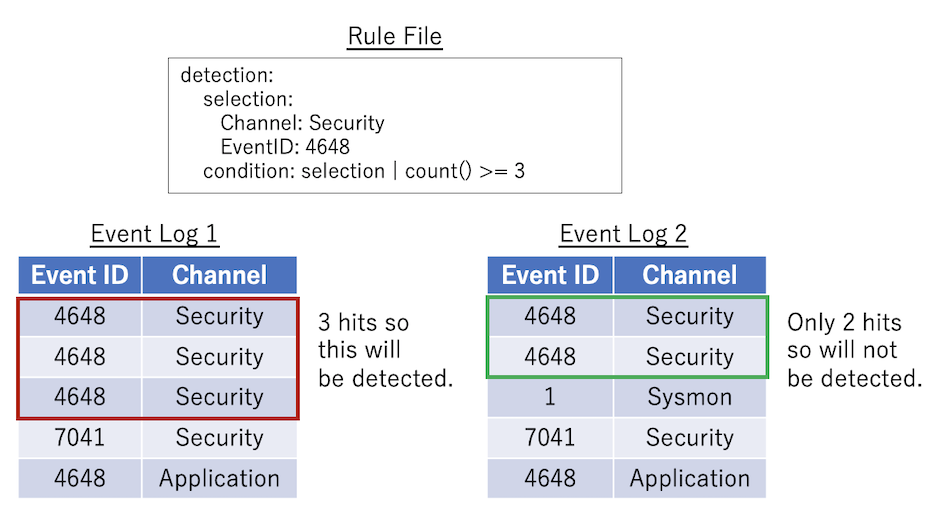
This is the most basic pattern: count() {operator} {number}. The rule below will match if selection happens 3 or more times.
Pattern 2 example
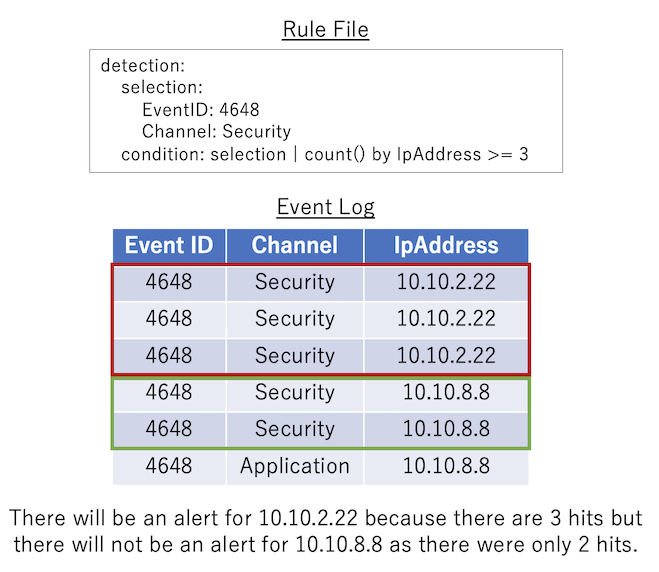
count() by {eventkey} {operator} {number}: Log events that match the condition before the pipe are grouped by the same {eventkey}. If the number of matched events for each grouping satisfies the condition specified by {operator} and {number}, then the condition will match.
Pattern 3 example
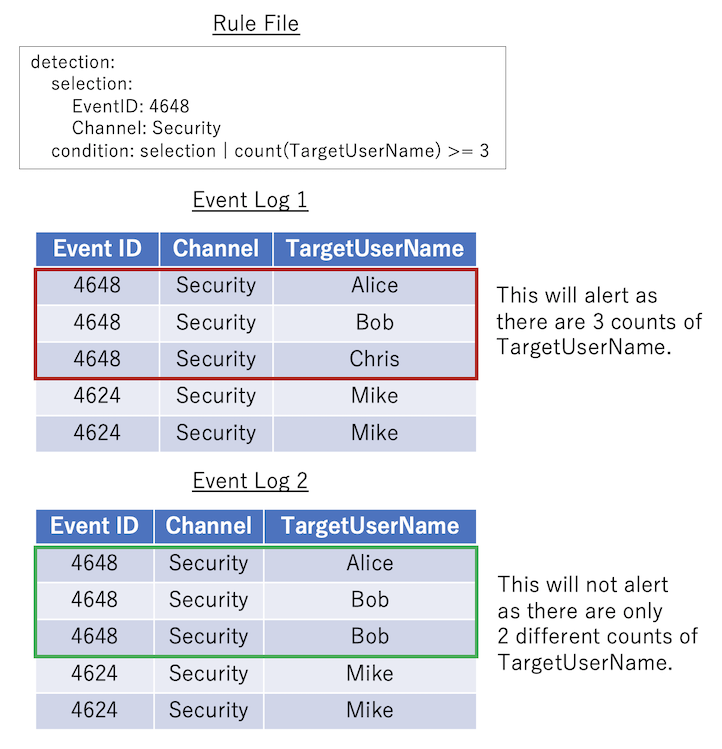
count({eventkey}) {operator} {number}: Counts how many different values of {eventkey} exist in the log event that match the condition before the condition pipe. If the number satisfies the conditional expression specified in {operator} and {number}, the condition is considered to have been met.
Pattern 4 example
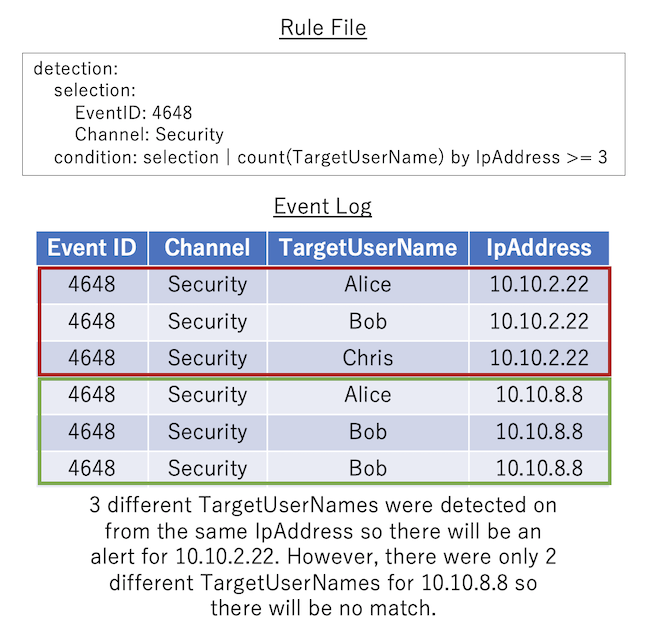
count({eventkey_1}) by {eventkey_2} {operator} {number}: The logs that match the condition before the condition pipe are grouped by the same {eventkey_2}, and the number of different values of {eventkey_1} in each group is counted. If the values counted for each grouping satisfy the conditional expression specified by {operator} and {number}, the condition will match.
Count rule output
The details output for count rules is fixed and will print the original count condition in [condition] followed by the recorded eventkeys in [result].
In the example below, a list of TargetUserName usernames that were being bruteforced followed by the source IpAddress:
[condition] count(TargetUserName) by IpAddress >= 5 in timeframe [result] count:41 TargetUserName:jorchilles/jlake/cspizor/lpesce/bgalbraith/jkulikowski/baker/eskoudis/dpendolino/sarmstrong/lschifano/drook/rbowes/ebooth/melliott/econrad/sanson/dmashburn/bking/mdouglas/cragoso/psmith/bhostetler/zmathis/thessman/kperryman/cmoody/cdavis/cfleener/gsalinas/wstrzelec/jwright/edygert/ssims/jleytevidal/celgee/Administrator/mtoussain/smisenar/tbennett/bgreenwood IpAddress:10.10.2.22 timeframe:5m
The timestamp of the alert will be the time from the first event detected.