Running Hayabusa
Caution: Anti-Virus/EDR Warnings and Slow Runtimes
You may receive an alert from anti-virus or EDR products when trying to run hayabusa or even just when downloading the .yml rules as there will be keywords like mimikatz and suspicious PowerShell commands in the detection signature.
These are false positives so will need to configure exclusions in your security products to allow hayabusa to run.
If you are worried about malware or supply chain attacks, please check the hayabusa source code and compile the binaries yourself.
You may experience slow runtime especially on the first run after a reboot due to the real-time protection of Windows Defender. You can avoid this by temporarily turning real-time protection off or adding an exclusion to the hayabusa runtime directory. (Please take into consideration the security risks before doing these.)
Windows
In a Command/PowerShell Prompt or Windows Terminal, just run the appropriate 32-bit or 64-bit Windows binary.
Error when trying to scan a file or directory with a space in the path
When using the built-in Command or PowerShell prompt in Windows, you may receive an error that Hayabusa was not able to load any .evtx files if there is a space in your file or directory path. In order to load the .evtx files properly, be sure to do the following:
- Enclose the file or directory path with double quotes.
- If it is a directory path, make sure that you do not include a backslash for the last character.
Characters not being displayed correctly
With the default font Lucida Console on Windows, various characters used in the logo and tables will not be displayed properly.
You should change the font to Consalas to fix this.
This will fix most of the text rendering except for the display of Japanese characters in the closing messages:

You have four options to fix this:
- Use Windows Terminal instead of the Command or PowerShell prompt. (Recommended)
- Use the
MS Gothicfont. Note that backslashes will turn into Yen symbols.
- Install the HackGen fonts and use
HackGen Console NF. - Use the
-q, --quietto not display the closing messages that contain Japanese.
Linux
You first need to make the binary executable.
Then run it from the Hayabusa root directory:
macOS
From Terminal or iTerm2, you first need to make the binary executable.
Then, try to run it from the Hayabusa root directory:
On the latest version of macOS, you may receive the following security error when you try to run it:
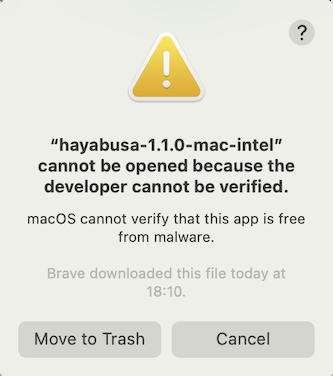
Click "Cancel" and then from System Preferences, open "Security & Privacy" and from the General tab, click "Allow Anyway".
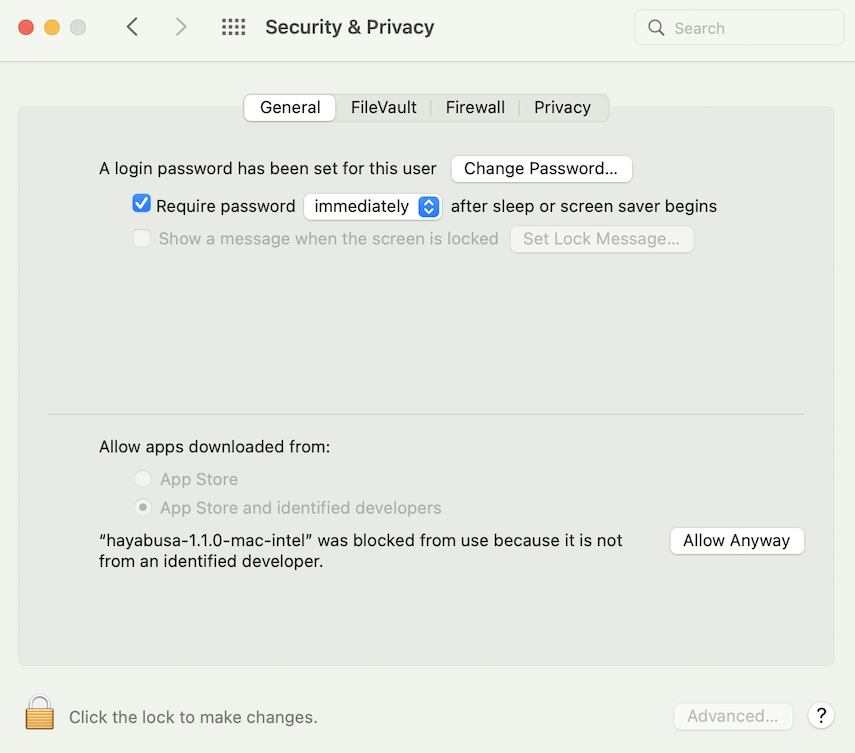
After that, try to run it again.
The following warning will pop up, so please click "Open".
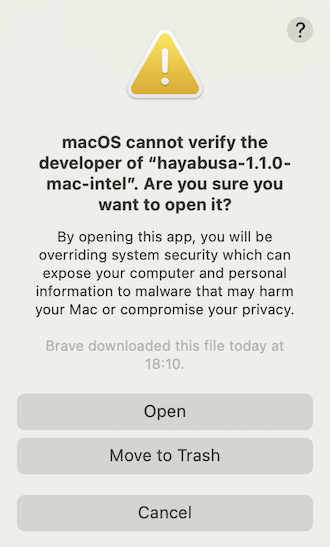
You should now be able to run hayabusa.