Extract Commands
extract-scriptblocks command
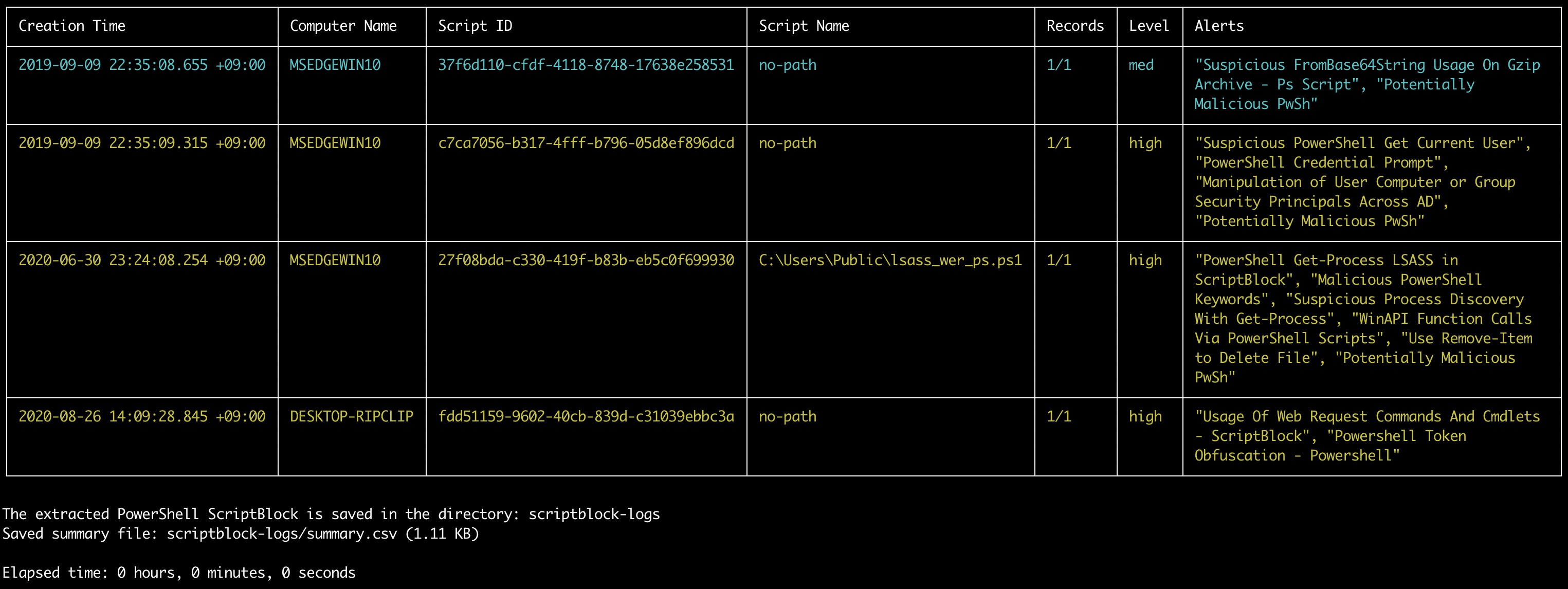
Extracts and reassemles PowerShell EID 4104 script block logs.
Note: The PowerShell scripts are best opened as
.ps1files with code syntax highlighting but we use the.txtextension in order to prevent any accidental running of malicious code.
- Input: JSONL
- Profile: Any
- Output: Terminal and directory of PowerShell Scripts
Required options:
-t, --timeline <JSONL-FILE-OR-DIR>: Hayabusa JSONL timeline file or directory
Options:
-l, --level: specify the minimum alert level (default:low)-o, --output: output directory (default:scriptblock-logs)-q, --quiet: do not display the launch banner (default:false)-s, --skipProgressBar: do not display the progress bar (default:false)
extract-scriptblocks command example
Prepare the JSONL timeline with Hayabusa:
Extract PowerShell EID 4104 script block logs to the scriptblock-logs directory:
extract-scriptblocks screenshot